OVC Message Board to Help Exchange Lessons and Practices (HELP) in Victim Services Office for Victims of Crime logo
horizontal navigation barNewsAbout UsHow To ParticipateFrequently Asked QuestionsHelpCalendarHost Bios
  Addressing Child Identity Theft as Financial Exploitation
-------
  Addressing Sexual Violence in Detention
-------
  Advocating for Victims' Rights in Tribal Courts
-------
  Applying for Funding and Managing Grants
-------
  Assisting Male Survivors of Sexual Violence
-------
  Assisting Stalking Victims Using Victim Notification
-------
  Building Resiliency Within Victim Service Organizations
-------
  Developing Tools to Assess Domestic Violence Lethality and Danger
-------
  Domestic Violence
-------
  Integrating Evidence-Based Practices Into Victim Services
-------
  Intersections Between Human Trafficking and Other Vulnerable Populations
-------
  Providing Pro Bono Services to Financial Abuse Victims
-------
  Raising Awareness for Survivors of Child Abuse and Neglect
-------
  Responding to Missing Children in Indian Country
-------
  Responding to Native LGBT/ Two Spirit Community Crime Victims
-------
  Responding to Victims of Environmental Crime
-------
  Responding to Victims of Property Crimes
-------
  Serving Child Victims of Sex Trafficking
-------
  Serving Older Victims of Financial Abuse
-------
  Transforming Victim Services in the 21st Century
-------
  Understanding Firearms Laws to Assist Domestic Violence Victims
-------
  Using Online Communications to Assist Crime Victims in the Military
-------
  Using Social Media to Assist Crime Victims
-------
  Using Therapy Dogs to Respond to Child Victims
-------
  Victim Assistance for Undocumented/ Temporary Immigrants
-------
   
  Home

How To Participate

Welcome to OVC's HELP for Victim Service Providers message board. We look forward to your contributions and hope you find involvement in our community an enriching experience. The information on this page will help you understand how the OVC Web Forum works and how you can participate in it. Follow the links below to learn more about each topic.


Participating in a Guest Host session

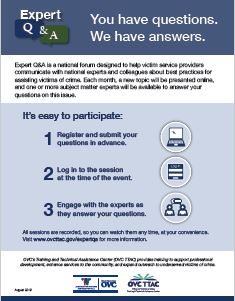
OVC introduced the Guest Host Series in October 2004 to provide victim service providers and allied professionals with access to national experts on topics of interest to the victim services community. No registration is required to participate. Take the following steps to join in a Guest Host session.

  • Submit questions in advance. Click on the "Ask your questions" link in the Guest Host box prior to the session and submit your questions as you would during a normal discussion. Your question will remain in queue until the day of the Guest Host session and will be posted in turn. The Guest Host will have the opportunity to review your question and formulate an answer prior to the session. Questions submitted in advance will appear at the start of the session and will be answered before questions submitted during the hour.

  • Return on the day of the Web Forum Guest Host session. Sessions always occur from 2 to 3 p.m. (eastern time).

  • Go to the topic the Guest Host is scheduled to discuss. Do this either by clicking on the “Now Online” icon at the upper right of the screen or by clicking on the topic in the list.

  • Submit questions during the session. During the Guest Host session, submissions will be posted within minutes of receipt. You will receive a response from the Guest Host during the online discussion hour. If your question is not answered during the session, it may be answered and posted to the discussion page within the next few days.

  • Refresh the page. You will need to refresh the discussion page every 2 to 4 minutes to view replies and new questions. To do this, click the "Refresh" link at the bottom of a discussion or press your browser's “Refresh” or “Reload” button.

The Guest Host's topic-specific expertise will remain part of the OVC Web Forum pages to be accessed at any time by other professionals in the victim services field. Sessions take place in onscreen print only; audio copies are not available. You can print sessions by clicking on your browser's “Print” button.

You can access Guest Host sessions from the past year by clicking on the topic discussed. Topics can be found on the calendar and biographies pages and on the main sidebar. You can access sessions that occurred more than 1 year ago by using the search box on the main page.

For additional information, please view the frequently asked questions (FAQs) page.

To learn more about participating in Web Forum discussions, choose a topic from the links below.

Back to Top


Navigating the forum

The topics listed on the forum home page are open for discussion. Click on a topic to see a detailed outline of the subjects users are “talking” about.

From this home page, you may select “View Details” to see all the posts in a specific discussion. Or, you may click on a specific message to go directly to that information.

Users may also reply to discussions and start new discussions from this page.

Back to Top


Replying to an ongoing discussion

Step 1—Select “Reply”

You may add comments to an existing discussion by selecting “Reply” on either the topic's directory page or at the end of the individual post on which you would like to comment. A form will appear that asks for your

  • Name.
  • E-mail address.
  • State.
  • Message text.

Step 2—Complete the form

You must complete the required fields to post messages and to be notified when your message is accepted for posting or deemed inappropriate for the forum. Note that you are not required to submit an e-mail address. For privacy purposes, your e-mail address will not appear onscreen unless you include it as part of your message. For added confidentiality, you may also want to use a special screen name.

Be sure to verify that the topic next to "Discussion Text" is the topic you intend to comment on. This ensures that your message will appear in the correct place. For maximum response to your message, see Additional tips for participants.

Check the box stating that you accept the rules for participating in the forum.

Note: Please keep your replies brief. For security reasons, you are limited to 20 minutes to compose and submit a message. Time begins when the submission form first appears.

Step 3—Select “Next”

View how your message will appear onscreen.

Step 4—Select “Submit”

If you are satisfied with your message, click “Post” to send it for screening by the forum moderator. (Any message or part of a message that contradicts the rules will not be accepted.) If accepted, your message will appear within 1 business day.

Back to Top


Starting a new discussion

Step 1—Select “Start a New Discussion”

To start a new discussion that focuses on information not already being discussed, select “Start a New Discussion” on the topic's directory page. A form will appear that asks for your

  • Name.
  • E-mail address.
  • Subject.
  • Message text.

Step 2—Complete the form

You must complete the required fields to post messages and to be notified when your message is accepted for posting or deemed inappropriate for the forum. Note that you are not required to fill in the E-mail box. However, e-mail addresses from this box will not appear onscreen. For privacy purposes, your e-mail address will not appear onscreen unless you include it as part of your message. For added confidentiality, you may also want to use a special screen name.

Be sure to verify that the topic area indicated is the appropriate place for the new discussion. For maximum response to the new discussion, see Additional tips for participants.

Check the box stating that you accept the rules for participating in the forum.

Note: Please keep your replies brief. For security reasons, you are limited to 20 minutes to compose and submit a message. Time begins when the submission form first appears.

Step 3—Select “Next”

View how your message will appear onscreen.

Step 4—Select “Post”

If you are satisfied with your message, click “Post” to send it for screening by the forum moderator. (Any message or part of a message that contradicts the rules will not be accepted.) If accepted, your message will appear within 1 business day.

Back to Top


Suggesting a new discussion topic

If the topic you are interested in is not available on the forum home page, select “Suggest a Topic” (also on the forum home page) to notify the moderator via e-mail that you would like to open a new discussion topic.

Back to Top


Additional tips for participants

If you are new to the OVC HELP for Victim Service Providers Web Forum, you may find the following tips helpful:

  • Be brief but detailed in your posts. Include a clear description of your program, problem, or solution. Be constructive, positive, and open.

  • Establish a clear topic. The first post in a discussion establishes the subject by which all subsequent posts will be known, so the subject line should be as descriptive and specific as possible.

  • Reply in the correct area. Verify that your post will appear in the desired location by checking the information in the "Topic" and "Discussion Text" fields on the reply forms.

  • Follow the rules. Inappropriate comments will not be accepted.

Back to Top

Home | Site Map | Rules | Help | What Is a Web Forum? | Contact Us | Links | Link to the Web Forum

DOJ Home | OJP Home | CrimeSolutions.gov | GMS | Grants.gov | Privacy Policy
Legal Policies and Disclaimers | FOIA | USA.gov | Recovery.gov

Office for Victims of Crime
810 Seventh Street NW., Eighth Floor, Washington, DC 20531
The Office for Victims of Crime is a component of the Office of Justice Programs,
U.S. Department of Justice.